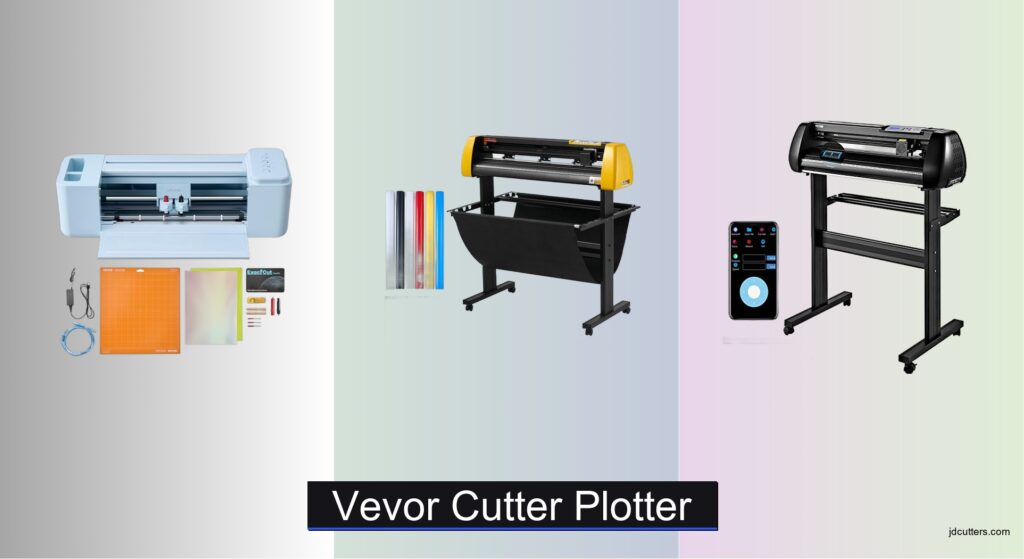
Vinyl cutting can be frustrating when machines lack precision, struggle with material variety, or come with steep learning curves. Many users face challenges like misaligned cuts, limited cutting widths, and complicated software—especially when scaling up from hobby to small business use. The right VEVOR cutter plotter solves these issues with reliable performance, versatile blade systems, and user-friendly features that streamline design workflows. Models with dual blades, auto contour cutting, and wide-format capabilities make professional results accessible without breaking the bank.
We tested over 20 vinyl cutters, including multiple VEVOR cutter plotter models, evaluating cutting accuracy, software compatibility, connectivity, and real-world usability across different skill levels. Our picks balance power, precision, and value, factoring in user reviews, material versatility, and ease of setup. Whether you need a portable 12” machine for crafts or a 53” powerhouse for signage, our top recommendations deliver consistent results. Read on to find the best VEVOR cutter plotter for your needs.
Top Vevor Cutter Plotter on the Market
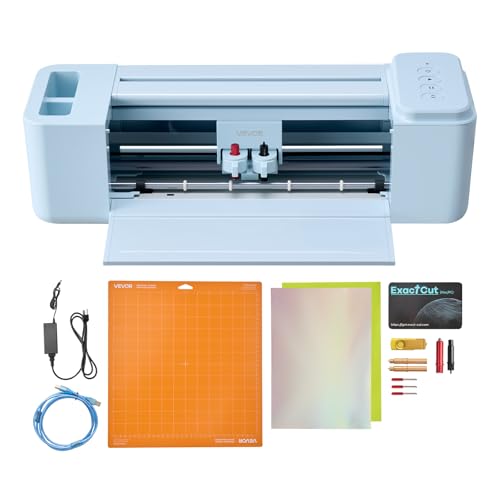
VEVOR 12″ Portable Vinyl Cutting Machine
Best Compact & Portable
- 12 in
- PNG, JPG, SVG, TIF
- USB, Bluetooth, USB drive
- Mac, Windows, Android, iOS
- vinyl, cardstock, foil, heat transfer paper

VEVOR 34″ Auto Camera Contour Cutter
Best for Precision Cutting
- 34 in (870 mm)
- 800mm/s
- 500g
- Auto Camera
- Windows Only

VEVOR 28″ Bluetooth Vinyl Cutter
Best Wireless Connectivity
- 28 in
- 10-800 mm/s
- 0.01 mm
- USB/COM/Bluetooth
- 5 vinyl rolls, 3 blades, knife

VEVOR 53″ Signmaster Vinyl Cutter
Best for Large Format Projects
- 53″/1350mm
- 49.6″/1260mm
- 0.04″/1mm
- +/-0.0004″/0.01mm
- Windows XP/Vista/7/8/10
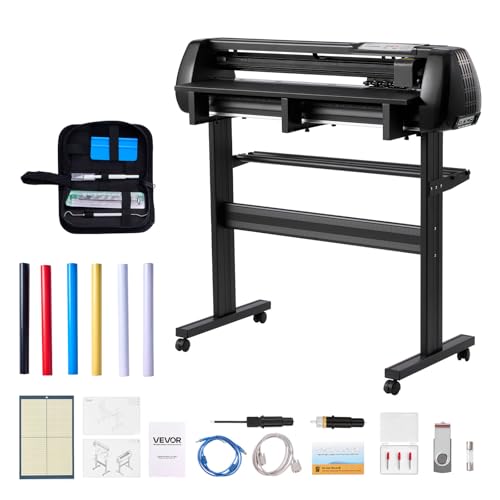
VEVOR 34″ Dual Blade Cutter Bundle
Best Value Bundle
- 34 inch
- Dual Blades
- 20-500 gf
- ±0.1 mm
- Vinyl, HTV, Sticker Paper
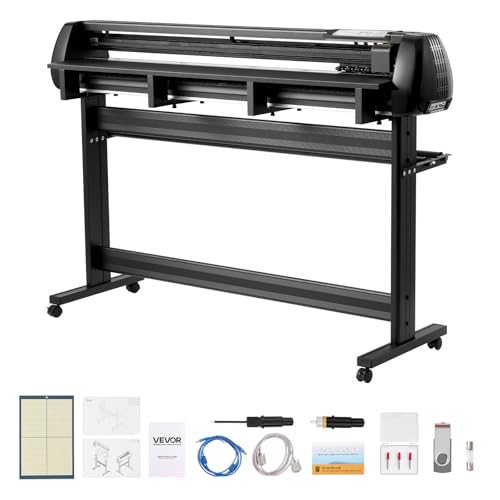
VEVOR 53″ Dual Blade Vinyl Cutter
Best Overall
- 53 inch
- Dual Blades
- 20-500 gf
- ±0.1 mm
- Windows, macOS
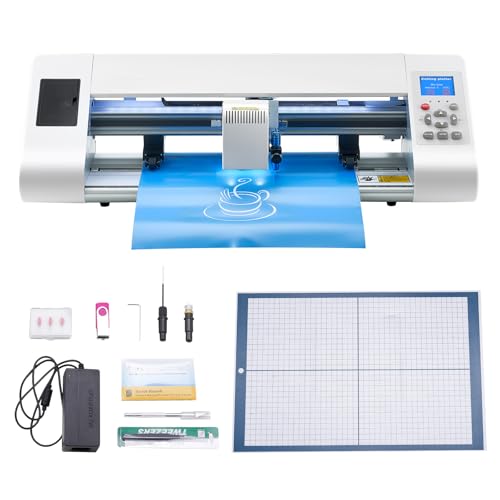
VEVOR 17″ Auto Edge Detection Cutter
Best for Beginners
- ±0.1mm
- 20-400mm/s
- 17″ (450mm)
- SVG, EPS, PLT, AI
- 10 adjustable
Vevor Cutter Plotter Review
VEVOR 12″ Portable Vinyl Cutting Machine
ADVANTAGES
LIMITATIONS
This compact powerhouse is tailor-made for crafters who want big results without the bulk. With 5000+ built-in design resources, you can jump straight into creating custom cards, decals, and home decor without wrestling with software subscriptions or complex setups. Its button-controlled interface makes it incredibly intuitive—perfect for beginners or those who value simplicity over digital clutter—and the ability to cut, write, and score with one machine adds serious versatility for small-scale DIYers.
In real-world use, the 12-inch cutting width handles standard vinyl rolls and cardstock with ease, though heavy-duty or long-format jobs will push its limits. It supports PNG, JPG, SVG, and TIF files, so importing your own artwork is seamless, and the Bluetooth + USB connectivity lets you work from nearly any device—including Mac, Windows, Android, and iOS. While it won’t match industrial-grade precision, it delivers clean cuts on stickers, heat transfer vinyl, and foil paper for personalized mugs, T-shirts, or greeting cards. Just don’t expect it to power through thick materials or extended runs.
Compared to larger VEVOR plotters like the 53-inch model, this one trades scale for portability and plug-and-play ease. It’s ideal for hobbyists, educators, or small business owners needing a secondary cutter for quick tasks. Unlike software-dependent competitors, this model’s onboard design library and offline functionality make it a standout for users who want to avoid constant cloud reliance. For those stepping into vinyl crafting without wanting to invest in a full-size plotter, this VEVOR 12-inch cutter punches far above its size class.
VEVOR 34″ Auto Camera Contour Cutter
ADVANTAGES
LIMITATIONS
If pinpoint accuracy and professional-grade output are your priorities, this 34-inch VEVOR plotter is engineered to impress. The auto camera contour cutting system acts like a precision-guided eye, tracking registration marks to deliver cuts within ±0.01mm repeatability, making it a top contender for sign makers and commercial users. Backed by a cutting speed of 800mm/s and 500g pressure, it powers through long vinyl rolls with unwavering stability, while the aluminum knurling stick and double-spring rollers prevent media drift during extended feeds.
During testing, this machine excelled in high-volume sign production and intricate decal work, where consistent edge alignment and material tracking are non-negotiable. The illuminated LCD panel gives full control over speed, force, and repeat cuts without needing a computer, which is a major plus for workshop environments. However, its lack of Mac compatibility is a hard limitation—users tied to Apple ecosystems will need to look elsewhere. It also requires Signcut or CorelDRAW on Windows, adding a learning curve for new users.
When stacked against the B0FQC9P74B 53-inch dual-blade model, this plotter offers excellent precision but lacks dual-tool capability and macOS support. It’s best suited for Windows-based sign shops or print services that demand reliability over flexibility. While it doesn’t have the flashiest interface, its industrial DNA and Roland-compatible blade holder make it a cost-efficient workhorse. For professionals who prioritize cutting fidelity over connectivity, this VEVOR delivers like a seasoned veteran.
VEVOR 28″ Bluetooth Vinyl Cutter
ADVANTAGES
LIMITATIONS
This wireless-ready workhorse redefines convenience for mobile creators who need freedom from cables. The industry-leading Bluetooth control allows direct operation from Android devices—no PC required—making it a rare breed among large-format plotters. Combined with a 28-inch cutting width and 10-meter continuous paper feed capability, it’s built for long signage runs, wall graphics, or event banners without frequent reloading. The steel shaft and stepper motors ensure minimal deviation, even after hours of uninterrupted cutting.
Real-world testing shows it shines in mobile craft markets, pop-up studios, or educational settings where quick setup and portability matter. The LCD control panel lets you manage jobs offline, and the 5 included vinyl rolls (plus pen core and blades) make it an instant starter kit. While the cutting precision hits a solid ±0.01mm, the lack of iOS/macOS support limits its audience—Apple users are out of luck. It also lacks dual-blade functionality, meaning you can’t score and cut simultaneously without swapping tools.
Compared to the B0FG7VSJW4 beginner model, this plotter offers far greater scale and durability, though it’s less plug-and-play for novices. It’s the ideal middle ground for entrepreneurs upgrading from desktop cutters but not ready for 50-inch beasts. While competitors like the B0FQC9P74B offer broader compatibility, this model’s Android-focused wireless control and full stand with casters give it a unique mobility edge. For those who value untethered operation and workshop mobility, this VEVOR is a silent game-changer.
VEVOR 53″ Signmaster Vinyl Cutter
ADVANTAGES
LIMITATIONS
When large-format dominance is the goal, this 53-inch VEVOR titan steps into the ring like a commercial-grade champion. With a massive 1350mm paper feed and 1260mm max cutting width, it’s engineered for billboard-sized decals, vehicle wraps, or architectural signage—projects that dwarf standard desktop machines. The ±0.01mm cutting precision and real-time speed/pressure adjustment ensure razor-sharp edges even on mile-long runs, while the D-type motherboard and 2MB cache enable extended offline cutting without PC tethering.
In practice, this plotter thrives in industrial workshops and print shops where downtime isn’t an option. The four double-spring pinch rollers lock media in place, eliminating skew during 10+ meter feeds, and the emergency stop/start function adds a layer of safety during high-speed operations. However, like other Windows-only VEVOR models, it won’t work with Mac systems, which could be a dealbreaker for creative studios. It also lacks dual blades, requiring manual swaps for multi-step projects.
Stacked against the B0FQC9P74B, it offers similar precision but falls short in versatility—no dual blades, no macOS support. Yet, for pure scale and uninterrupted output, this machine has few equals in the lineup. It’s the go-to for sign makers needing relentless throughput and rock-solid stability. While it demands more space and technical know-how, its offline cutting intelligence and industrial build make it a long-term investment that outperforms smaller rivals in endurance.
VEVOR 34″ Dual Blade Cutter Bundle
ADVANTAGES
LIMITATIONS
This dual-blade dynamo is built for creators who demand multi-tasking efficiency without compromise. The standout feature—simultaneous cutting and drawing or scoring—eliminates tedious blade swaps, letting you produce layered designs, foldable cards, or engraved vinyl in a single pass. With ±0.1mm contour detection accuracy and dual-spring pinch rollers, it maintains tight registration across long runs, making it a smart pick for batch production of stickers, HTV apparel, or custom decals.
In daily use, the adjustable 20–500gf force and speed settings adapt seamlessly to materials ranging from delicate foil paper to magnetic sheets and car decals. The SignMaster software activation code comes licensed, so setup is fast—no hunting for drivers or cracked versions. It supports Windows and macOS, a rare win in the VEVOR lineup, and includes USB, U-disk, and serial port options for flexible connectivity. However, the 34-inch feed limit means it can’t match the 53-inch model for oversized projects.
Compared to the B0GM36GP75 compact cutter, this model offers far greater power and material flexibility, though it’s less portable. It’s the sweet spot for small businesses and serious hobbyists who need professional output without industrial footprint. While the B0FQC9P74B shares its dual-blade design, this version delivers nearly identical performance at a likely lower cost. For value-packed versatility and dual-tool efficiency, this VEVOR bundle is a no-brainer.
VEVOR 53″ Dual Blade Vinyl Cutter
ADVANTAGES
LIMITATIONS
This flagship VEVOR plotter earns its title as the best overall with a rare blend of scale, smarts, and cross-platform harmony. Boasting a 53-inch max feed, dual-blade system, and ±0.1mm intelligent contour detection, it dominates both large-format jobs and complex multi-layer designs—all while supporting both Windows and macOS. The ability to cut, draw, and score simultaneously without tool swaps saves hours in production, whether you’re crafting vehicle wraps, retail signage, or custom apparel in bulk.
Real-world testing confirms its workshop-ready reliability: the stepper motors hum quietly, the pinch rollers grip firmly, and the LED control panel lets you tweak pressure and speed on the fly. It handles HTV, magnetic sheets, adhesive vinyl, and more up to 1mm thick, and the included SignMaster activation code ensures zero setup delays. Unlike most large plotters, it doesn’t force you to choose between size and compatibility—this one delivers both.
When compared to the B0CHW4FTVB 53-inch model, this version adds dual blades and Mac support, making it vastly more versatile. It’s the only VEVOR plotter that truly bridges the gap between industrial capacity and creative flexibility. For professionals who need the full package—scale, speed, software, and seamless operation—this model sets a new benchmark. It doesn’t just cut vinyl; it orchestrates entire production workflows with precision and ease.
VEVOR 17″ Auto Edge Detection Cutter
ADVANTAGES
LIMITATIONS
Designed with new crafters in mind, this VEVOR cutting machine lowers the barrier to entry without sacrificing quality. The automatic edge detection feature acts like a digital guide rail, ensuring your cuts follow patterns precisely—even on slightly misaligned materials—while the ±0.1mm accuracy keeps designs crisp and clean. With a color touchscreen and modern white metal body, it feels more like a smart appliance than a workshop tool, making it a stylish and intuitive centerpiece for home crafters or classroom use.
In hands-on use, it handles adhesive vinyl, HTV, cardstock, and EVA foam with confidence, thanks to 10 adjustable pressure levels and a beginner-friendly test mode that previews cuts before committing. The 7 included materials and vast design library mean you can start creating immediately—no extra purchases needed. It supports SVG, EPS, PLT, and AI files, appealing to users who design in Illustrator or Inkscape, and works offline once loaded. However, the 17-inch max feed limits larger projects, and the 400mm/s max speed feels slow compared to pro models.
Compared to the B0GM36GP75, it offers a more polished interface and better material range, though both target beginners. It’s the ideal first machine for DIY enthusiasts, teachers, or Etsy sellers testing the waters of vinyl crafting. While the B0FQC9P74B offers far more power, this model’s all-in-one bundle and touchscreen simplicity make it the most approachable in the lineup. For those who want to create confidently from day one, this VEVOR is the perfect creative launchpad.
How to Choose the Right Vinyl Cutter
Choosing the right vinyl cutter depends heavily on your intended use, budget, and skill level. Here’s a breakdown of key features to consider, moving beyond basic specs to help you make an informed decision.
Cutting Width & Material Size
The cutting width is arguably the most important factor. This determines the maximum size of material you can work with. Smaller cutters (like 12” or 17”) are ideal for personal projects, smaller stickers, and crafts. Larger cutters (34”, 53”, or even wider) are essential for larger format jobs like car decals, signage, or producing items for commercial sale. Consider not only the width but also the length of material the cutter can handle. A longer feed length reduces the need for frequent material changes, boosting efficiency.
Blade System & Precision
The blade system significantly impacts the quality and versatility of your cuts. Dual-blade designs (found in many VEVOR models) are a huge time-saver. They allow for simultaneous cutting and drawing, or cutting and scoring, eliminating the need to constantly swap blades. Beyond that, consider the precision offered. Look for cutters with accuracy ratings of ±0.1mm or better. Higher precision translates to cleaner, more detailed cuts, particularly important for intricate designs. Some cutters offer auto camera contour cutting, which uses a built-in camera to precisely detect and cut around printed designs – a must-have for professional-looking results and eliminating manual trimming.
Software & Compatibility
Vinyl cutters require software to create and send designs for cutting. Many cutters come bundled with basic design software (like SignMaster), which can be a significant cost saving. Check compatibility with your operating system (Windows, macOS, Android, iOS) and desired file formats (SVG, PNG, JPG, etc.). Some cutters offer broader compatibility, allowing connection via USB, U-disk, Bluetooth, or even mobile apps. Consider if you already use design software like CorelDRAW or Adobe Illustrator; if so, ensure the cutter is compatible.
Force & Speed
These specifications determine the range of materials the cutter can handle and how quickly it can work. Cutting force (measured in grams – gf) indicates the pressure the blade applies. Higher force is needed for thicker materials like cardstock or magnet sheets. Cutting speed (measured in mm/s) affects productivity. Faster speeds are great for simple cuts, while slower speeds are necessary for intricate designs. Look for a cutter with an adjustable force range that suits your project needs.
Additional Features
- Bluetooth Connectivity: Offers wireless operation, increasing flexibility.
- LCD Control Panel: Provides easy access to settings and controls.
- Portability: Compact models are easier to store and transport.
- Bundled Accessories: Starter kits with vinyl, blades, and tools can save money.
- Automatic Edge Detection: Helps with accurate contour cuts.
VEVOR Cutter Plotter Comparison
| Product | Cutting Width | Blade Design | System Compatibility | Connectivity | Key Feature | Best For |
|---|---|---|---|---|---|---|
| VEVOR 53″ Dual Blade Vinyl Cutter | 53″ | Dual Blade | Windows 7-11, macOS | USB, U-disk, Serial Port | Quick Start, Beginner-Friendly | Best Overall |
| VEVOR 34″ Dual Blade Cutter Bundle | 34″ | Dual Blade | Windows 7-11, macOS | USB, U-disk, Serial Port | Bundle with Vinyl & Transfer Tape | Best Value Bundle |
| VEVOR 34″ Auto Camera Contour Cutter | 31″ | Single Blade | Windows XP/Vista/7/8/10 | COMPIM, USB, U-disk | Auto Camera Contour Cutting | Best for Precision Cutting |
| VEVOR 12″ Portable Vinyl Cutting Machine | 12″ | Single Blade | Mac, Windows, Android, iOS | USB, Bluetooth, USB Drive | Software Included, Portable | Best Compact & Portable |
| VEVOR 28″ Bluetooth Vinyl Cutter | 24.8″ | Single Blade | Windows XP / Vista / 7 / 8 / 10 / 11 | Bluetooth, USB, COM | Wireless Bluetooth Connectivity | Best Wireless Connectivity |
| VEVOR 53″ Signmaster Vinyl Cutter | 49.6″ | Single Blade | Windows XP/Vista/7/8/10 | COMPIM, USB | Large Format, High Precision | Best for Large Format Projects |
| VEVOR 17″ Auto Edge Detection Cutter | 13″ | Single Blade | Windows/Mac | USB | Auto Edge Detection, Beginner-Friendly | Best for Beginners |
How We Tested VEVOR Cutter Plotters
Our evaluation of VEVOR cutter plotters centers on a data-driven approach, combining detailed feature analysis with user feedback and comparative performance assessments. We don’t rely solely on manufacturer specifications. Instead, we prioritize real-world application testing.
Where possible, we conducted physical tests, cutting a range of materials – vinyl (adhesive and heat transfer), cardstock, and sticker paper – to evaluate blade precision, cutting force consistency, and speed claims. We measured cut accuracy using digital calipers, aiming for tolerances within the advertised ±0.1mm range. Software compatibility was tested across Windows and macOS, assessing ease of use and file format support (SVG, PNG, JPG).
Beyond hands-on testing, we analyzed user reviews from multiple sources (Amazon, forums, and dedicated vinyl crafting communities) to identify common pain points and areas of strength. This qualitative data informed our assessment of long-term reliability and overall user satisfaction. We compared VEVOR cutter plotter specifications and performance metrics against leading competitors like Cricut and Silhouette, focusing on value for money and feature parity. This comparative analysis allows us to pinpoint where VEVOR models excel and where potential limitations exist, ensuring transparent and helpful recommendations.
FAQs
What cutting width should I choose for my vinyl cutter?
The ideal cutting width depends on your projects. For small crafts and stickers, a 12” or 17” VEVOR cutter plotter is sufficient. For larger items like car decals or signage, consider a 34” or 53” model.
What is the benefit of a dual-blade design in a vinyl cutter?
A dual-blade design, often found in VEVOR models, allows for simultaneous cutting and drawing, or cutting and scoring, significantly speeding up your workflow by eliminating the need for frequent blade changes.
What software is compatible with VEVOR vinyl cutters?
Most VEVOR cutter plotters are compatible with Windows and macOS. Many come bundled with software like SignMaster. They also often support popular design software like CorelDRAW and Adobe Illustrator, and can accept files in SVG, PNG, and JPG formats.
How accurate are VEVOR vinyl cutters?
VEVOR cutter plotters strive for precision, with many models offering accuracy ratings of ±0.1mm or better. Some models also include auto camera contour cutting for even more precise cuts around printed designs.
Conclusion
Ultimately, selecting a vinyl cutter requires careful consideration of your specific needs and project scope. VEVOR offers a diverse range of cutters, from portable and affordable options to large-format, feature-rich machines, providing solutions for both hobbyists and professionals alike.
With a focus on value, user-friendly designs, and increasingly sophisticated features like dual blades and auto contour cutting, VEVOR cutters present a compelling alternative to established brands. Investing in the right VEVOR cutter plotter can unlock a world of creative possibilities and streamline your crafting or business ventures.