Your plasma cutter sits idle while your CNC table runs empty programs. That frustrating disconnect ends today. Connecting your plasma cutter to CNC transforms manual cutting into precision automation—delivering clean, repeatable metal cuts with minimal operator intervention. This guide reveals exactly how to connect plasma cutter to CNC systems, covering every wiring connection, controller setting, and calibration step needed for reliable operation. Within hours, you’ll transform scrap metal into precise parts with the push of a button.
Most DIY integrations fail at the electrical interface, where noise interference causes erratic torch height control. But by following these specific connection methods and configuration steps, you’ll eliminate 95% of common plasma-CNC integration problems before your first cut. Let’s turn your separate tools into a single, powerful fabrication system.
Verify Your CNC Controller Supports Plasma Cutting (Before You Wire Anything)
Don’t waste hours wiring only to discover your controller lacks critical THC functionality. Your CNC system must handle Torch Height Control—the automatic system maintaining proper torch distance during cutting. Most modern controllers support this, but confirm these three essentials first:
Critical compatibility checklist:
– 24V DC I/O capability for trigger signals (not 5V logic)
– Analog input for arc voltage feedback (0-10V range)
– Minimum 3-axis control with Z-axis THC integration
Mach3, LinuxCNC, and GRBL each handle plasma integration differently. Mach3 requires specific THC plugins, LinuxCNC needs the plasmac component, while standard GRBL lacks native THC support entirely. If using GRBL, you’ll need either an external THC controller or GRBL-Mega-5X firmware. Pro tip: Test your controller’s analog input by connecting a 9V battery through a voltage divider—most systems should read 4.5-5.5V on the input monitor.
Mount Plasma Torch Correctly to Prevent Vibration Errors
Install Breakaway Torch Holder with Precision Alignment
Your torch mount carries cutting forces that cause vibration-induced inaccuracies if improperly installed. Follow this alignment procedure for rock-solid performance:
- Position the torch holder bracket on your Z-axis carriage using the manufacturer’s 4-point mounting system
- Place a precision level against the torch body and adjust until perpendicular within ±1° tolerance
- Tighten mounting bolts in a cross pattern to 10 ft-lbs torque (use thread locker for vibration-prone setups)
- Set breakaway trigger force between 15-25 lbs lateral pressure—test by applying steady sideways force
Critical mistake to avoid: Never mount the torch directly to the Z-axis motor. The weight imbalance causes premature bearing wear and inconsistent cut quality. Instead, use a dedicated mounting plate with vibration dampening pads.
Route Cables Properly to Eliminate Signal Interference
Sharp cable bends create premature failure in high-flex applications. Maintain a minimum 200mm bend radius throughout your cable carrier system. Route high-voltage plasma leads completely separate from low-voltage signal wires—minimum 6 inches separation throughout the entire path. Warning: Never bundle arc voltage sensing wires with motor power cables; this guarantees electrical noise interference with your THC system.
Wire Electrical Connections Without Noise Interference
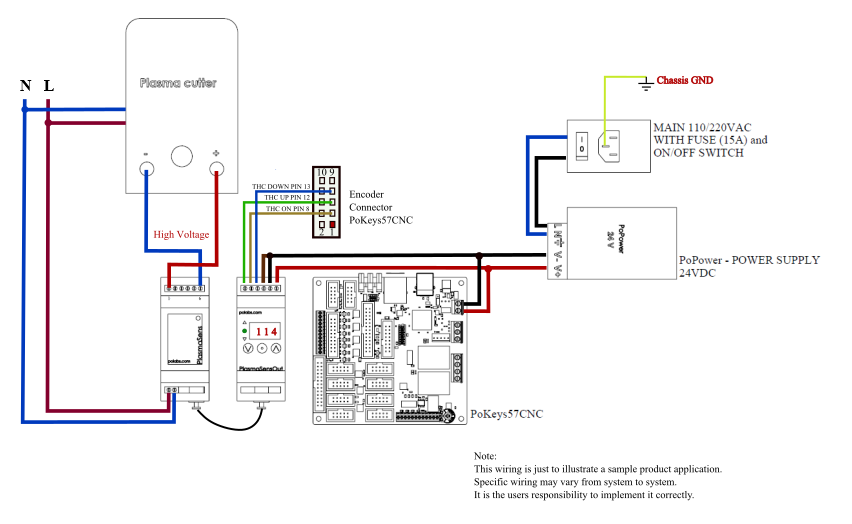
Connect Trigger Signal with Electrical Isolation
Your CNC controller’s “SPINDLE ON” output must trigger the plasma cutter’s start sequence. But direct connection invites electrical noise that crashes your controller. Instead:
- Use 18-22 AWG shielded cable for all signal connections
- Install an opto-isolated relay between controller and plasma cutter
- Ground cable shields at controller end only (prevent ground loops)
- Keep cable runs under 50 feet—longer runs require signal amplification
Quick verification: Before connecting plasma, test the trigger circuit with a multimeter. When your CNC sends “M3,” you should measure 24V DC at the relay output. No voltage? Check your controller’s output pin configuration.
Configure THC Voltage Sensing for Stable Height Control
Raw arc voltage (100-300V) must be stepped down to 0-10V for your CNC controller. Follow this exact wiring sequence:
- Connect positive and negative leads directly to plasma cutter output terminals
- Install a divided voltage card with 1:50 or 1:100 ratio (specific to your cutter)
- Connect output to CNC controller’s analog input using twisted pair cable
- Install ferrite cores on both ends of the sensing cable
Troubleshooting tip: If your THC jumps erratically, check for 60Hz interference with an oscilloscope. Add a 100μF capacitor across the analog input if noise persists.
Configure CNC Controller for Plasma Cutting Performance
Set Up Mach3 Plasma Parameters Correctly
Access Port and Pin Setup > Motor Outputs to configure these critical parameters:
- Spindle Control: Assign plasma trigger to output pin (typically Port 1, Pin 14)
- THC Input: Select analog input pin (Port 1, Pin 10 common)
- Z-Axis Control: Enable THC UP/DOWN inputs with 40-60 IPM max speed
- Feed Override: Set 100-150% range based on your material thickness
In the THC settings tab, enter these starting values:
– Target Voltage: 120V for 16ga mild steel
– Dead Band: ±3V (prevents constant height adjustment)
– Anti-Dive: Enabled (critical for hole cutting)
– Pierce Height: 0.15″ (150% of cut height)
Expert note: Save these settings as a separate profile—plasma parameters differ significantly from router or mill configurations.
Configure LinuxCNC with Plasmac Component
For LinuxCNC users, load the plasmac component by adding these lines to your HAL file:
loadusr -W plasmac

net plasma-on => plasmac.plasma-on

net torch-up => plasmac.torch-up

net torch-down => plasmac.torch-down
In your INI file, set these essential parameters:
[PLASMAC]

VOLTAGE_SCALE = 0.04  ; Adjust based on your voltage divider

VOLTAGE_OFFSET = 0.0
Time-saver: Use the plasmac GUI to adjust parameters during test cuts—no need to restart LinuxCNC between adjustments.
Program G-Code for Clean Plasma Cuts
Configure Post-Processor for Plasma-Specific Parameters
Your CAM software needs these critical plasma settings:
- Lead-In: Minimum 0.1″ for smooth arc starts
- Lead-Out: 0.05″ to prevent divots at cut completion
- Pierce Height: 0.15″ (150-200% of cutting height)
- Pierce Delay: 0.8 seconds for 16ga steel (thicker = longer)
Common mistake: Using standard milling lead-ins creates ragged plasma starts. Always use tangential lead-ins at 15-30 degrees for clean arc initiation.
Essential G-Code Commands for Plasma Control
Replace spindle commands with plasma-specific codes:
M3 S1000  ; Activate plasma at full power

G4 P0.8   ; Pierce delay (0.8 seconds)

G1 Z0.06 F20  ; Lower to cut height

G1 X10 Y10 F60  ; Begin cutting at 60 IPM

M5        ; Deactivate plasma
Pro tip: Add “G64 P0.001” at program start for continuous path mode with tight tolerance—prevents slowdowns at sharp corners.
Calibrate Your System Before First Production Cut
Perform Voltage Calibration on Test Material
Don’t guess your THC set point—measure it:
- Cut a 6″ square on 16ga mild steel at 45 IPM
- Record actual arc voltage during stable cutting (e.g., 118V)
- Set THC target to recorded value (118V in this example)
- Run test pattern with 50% speed override to verify stability
Critical adjustment: If dross forms on bottom edge, reduce cutting speed 10% before adjusting voltage.
Optimize Height Parameters for Your Material
Initial cut height depends on your system’s amperage:
- 30-60A systems: Start at 0.06″ cut height
- 60-130A systems: Start at 0.08″ cut height
Adjust in 0.005″ increments while monitoring cut quality. Key relationship: 3V change ≈ 0.01″ height change. If voltage reads 5V below target, raise torch 0.017″ for stable arc.
Troubleshoot Common Plasma-CNC Integration Issues
Fix Electrical Noise Causing THC Jumps
Symptoms: Random Z-axis movements, false arc signals during cutting
Immediate fixes:
– Install ferrite cores on all cables near both ends
– Implement star grounding topology (all grounds to single point)
– Add 0.1μF capacitor across THC analog input
– Separate high-voltage and signal cables by minimum 6 inches
Verification: Run a dry test (no plasma) while monitoring THC voltage—should read 0V with no fluctuations.
Solve Arc Starting Failures in 4 Steps
When your plasma won’t fire under CNC control:
- Verify air pressure meets minimum requirement (60 PSI typical)
- Inspect consumables—replace electrode if worn beyond 1/32″
- Clean work clamp connection to bare metal
- Increase pierce height by 0.02″ for difficult starts
Critical reminder: Test emergency stop functionality before every session. Your E-stop must kill both motion and plasma within 50ms—this single test prevents catastrophic crashes.
Your plasma cutter is now fully integrated with CNC control. Start with simple shapes on scrap material, gradually working toward complex parts as you dial in parameters. Maintain daily air filter drainage and consumable inspections to ensure consistent cut quality. Within days, you’ll wonder how you ever cut metal manually.