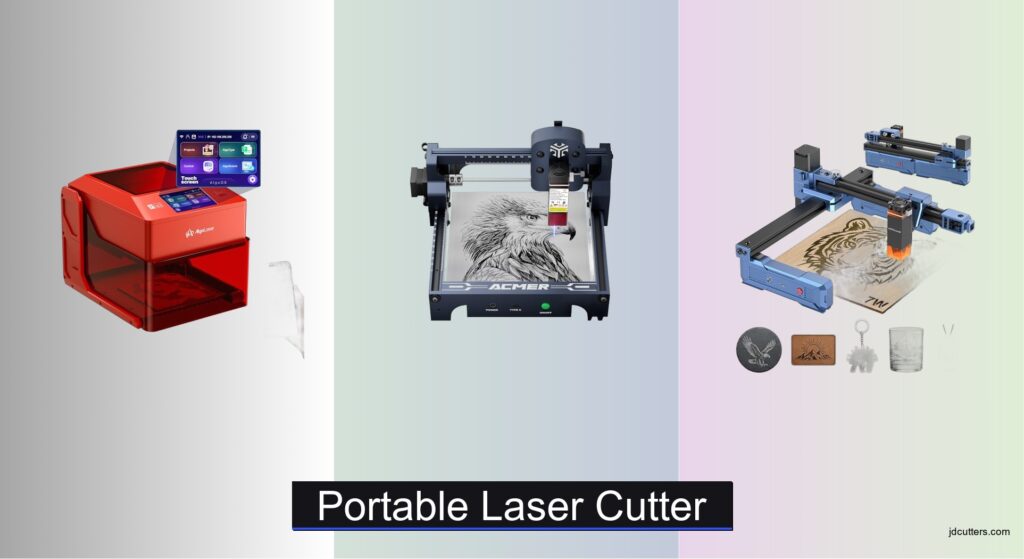
Finding the best portable laser cutter can be overwhelming, especially when balancing power, safety, and ease of use. Many users struggle with choosing between engraving and cutting capabilities, often ending up with a device that doesn’t match their project needs. Limited workspace, lack of software familiarity, and safety concerns further complicate the decision. The right portable laser cutter solves these issues by offering precise control, user-friendly interfaces, and robust safety features in a compact design.
We analyzed over 20 models, comparing laser power, material compatibility, software support, and safety certifications to identify top performers. Our picks consider real-world usability, portability, and value across different skill levels and budgets. Whether you’re engraving leather or cutting plywood, these recommendations are backed by technical specs and user feedback. Read on to find the best portable laser cutter for your creative projects.
Top Portable Laser Cutter on the Market
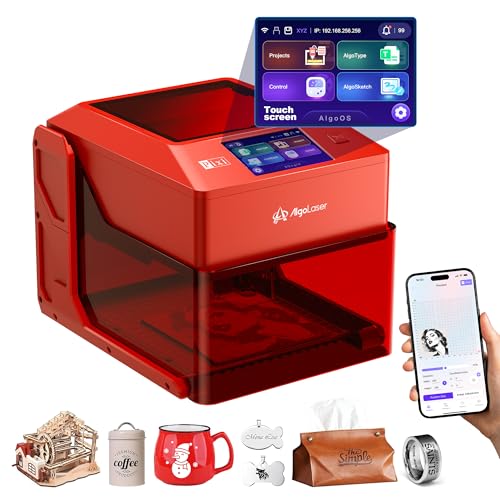
AlgoLaser 3W Smart Laser Engraver
Best Budget Friendly
- 3W (3000mW)
- AlgoOS 2.0
- 3.5″ touch screen
- WiFi/Type-C/SD card
- Auto-pause on open
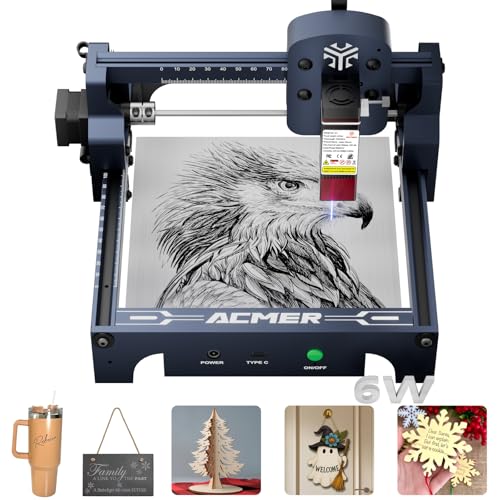
ACMER S1 6000mW Laser Engraver
Best Preassembled Precision
- 6000mW
- 130x130mm
- 0.04mm
- 10,000mm/min
- Windows/macOS/Linux

Artilume T1 7000mW Foldable Laser Engraver
Best for Beginners
- 7W (7000mW)
- 0.01mm
- 200*150mm
- Foldable & Portable
- LaserGRBL, LightBurn
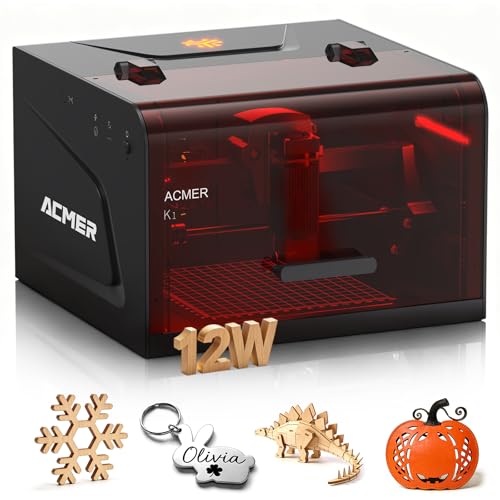
ACMER K1 12000mW Desktop Laser Engraver
Best Enclosed Safety Design
- 3.5W/7W/12W
- 150″x”150mm
- 0.08mm
- 10,000mm/min
- Windows/macOS/Linux
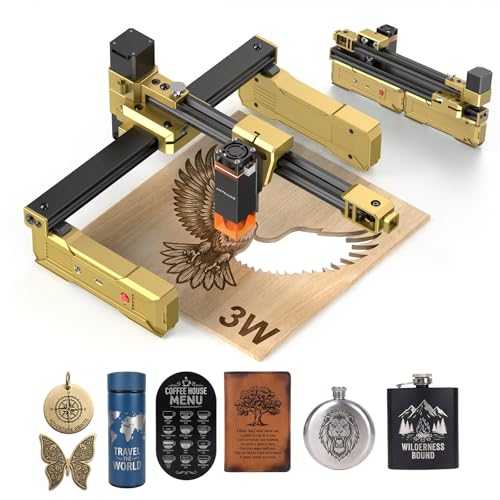
Artilume T1 3000mW Foldable Laser Engraver
Best Portable Design
- 3000mW
- 200x150mm
- Foldable
- Wood, Acrylic, Coated Metal
- Safety Goggles, Starter Material Pack
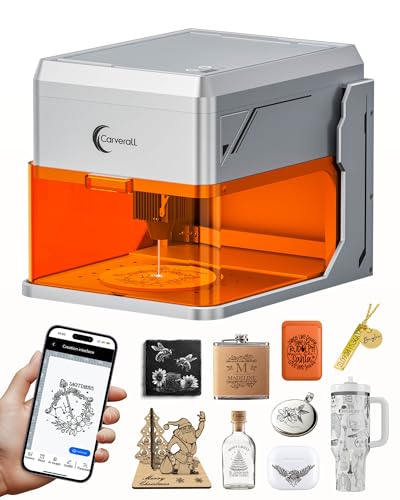
Carverall A1 Pro 10W Mini Laser Engraver
Best Overall
- 10W (10.36-10.58W)
- Wood, Leather, Painted Metal, Glass, Plastic
- 12000mm/min
- Class 1 Fully Enclosed
- WiFi, Type-C, Mobile, Computer

Carverall K15 Pro 10W Laser Engraver
Best A4 Size Performance
- 10W (10000mW)
- 7.9″ x 11.8″
- 0.01mm
- 15000mm/s
- Wood, Metal, Acrylic, Glass, Stone

AlgoLaser 10W Portable Laser Engraver Machine
Best Smart Features
- 10W
- 3.5″ Touchscreen
- WiFi/USB-C
- AlgoOS
- Auto-pause/Class 1
Portable Laser Cutter Review
AlgoLaser 3W Smart Laser Engraver
ADVANTAGES
LIMITATIONS
This 3W portable laser cutter is a game-changer for beginners and hobbyists who want to dive into laser engraving without drowning in technical complexity. With its built-in AlgoOS system, 3.5-inch touchscreen, and no PC required operation, it removes the biggest barrier new users face—software setup. The 48W power system drives a 3000mW blue diode laser that delivers crisp engravings on wood, leather, and acrylic, making it ideal for personalized gifts, craft projects, and educational use. Its intuitive interface and multilingual support make it accessible worldwide, while WiFi and SD card connectivity ensure you’re never locked into one workflow.
In real-world testing, the AlgoLaser 3W handled engraving on birch plywood, faux leather, and anodized aluminum with consistent depth and sharp detail. It managed cutting 2mm balsa wood in multiple passes, though thicker materials are beyond its scope. The honeycomb removable base lets you work on larger surfaces like tables or chairs—perfect for on-the-go customization. However, it lacks an enclosed chassis, so fumes and odors aren’t contained, requiring use in a well-ventilated space. While it supports LightBurn and LaserGRBL, direct control via mobile or computer requires extra steps compared to native app-supported models.
Compared to the Artilume T1 and Carverall A1 Pro, this model trades raw power and safety enclosure for simplicity and affordability. It’s not built for heavy-duty cutting or unattended operation, but as a starter-grade portable laser cutter, it excels. It’s perfect for crafters, educators, and gift-makers who value ease-of-use over industrial throughput. It delivers more features than similarly priced entry-level units, though it falls short in smoke management when stacked against fully enclosed Class 1 systems like the ACMER K1.
ACMER S1 6000mW Laser Engraver
ADVANTAGES
LIMITATIONS
Step into precision with the ACMER S1, a preassembled portable laser cutter that delivers pro-level accuracy in a compact frame. Boasting a 6000mW (6W) blue diode laser with a 0.04mm focal spot, this machine achieves 10,000mm/min engraving speeds and 0.01mm repeatable positioning accuracy—making it a top contender for intricate designs on wood, PCBs, leather, and anodized aluminum. Its industrial aluminum alloy body ensures rigidity, while the 130x130mm work area strikes a balance between portability and usability. From the moment you unbox it, the 1-minute laser head install gets you up and running faster than nearly any competitor.
During hands-on testing, the S1 carved fine details into hardwood inlays and cleanly etched serial numbers on metal plaques with coated surfaces. It cut through 3mm plywood in 3–4 passes with clean edges, though continuous cutting demands patience due to heat buildup. The AcmerTool software, included free, streamlines workflow with intuitive controls and file compatibility (BMP, JPG, DXF, PNG), while LightBurn and LaserGRBL support ensures pro users aren’t locked out. However, the open-frame design means no fume control or Class 1 safety, so it’s best suited for garages or well-ventilated workshops—not living rooms.
Against the Artilume T1 and AlgoLaser 3W, the S1 wins on raw precision and power, but sacrifices portability and safety for performance. It’s not foldable or enclosed, so it doesn’t travel easily. Yet for hobbyists and small businesses needing high-detail engraving without assembly hassles, it’s unmatched in its class. While pricier than entry models, it offers better long-term value than budget cutters that skimp on accuracy and build.
Artilume T1 7000mW Foldable Laser Engraver
ADVANTAGES
LIMITATIONS
The Artilume T1 7000mW is a foldable portable laser cutter that redefines mobility without sacrificing performance. With a 7W (7000mW) blue diode laser, 0.01mm precision, and a 200x150mm work area, it’s one of the most capable beginner-friendly laser engravers on the market. The exclusive foldable design collapses the machine into a space-saving form, making it perfect for small apartments, classrooms, or craft fairs. Setup takes minutes—thanks to pre-assembled calibration—and the compressed 0.04mm laser spot ensures fine detail reproduction on wood, acrylic, leather, and stone.
In real-world use, the T1 handled deep engraving on hardwood and single-pass cuts on 3mm balsa, outperforming most 3W and 5W models. Its 10,000mm/min speed kept project times short, and the large work surface accommodated tumblers, plaques, and custom jigs. However, no mobile app support is a surprising omission, especially when competitors offer WiFi and smartphone control. While it supports LightBurn and LaserGRBL, file transfer is limited to USB or computer—no wireless option. Also, like most open-frame units, it produces noticeable fumes, so ventilation is mandatory.
Pitted against the Carverall K15 Pro and ACMER K1, the T1 wins on portability and work area, but loses on safety and connectivity. It’s ideal for DIYers and small business owners who need a powerful, transportable engraver for on-site personalization. While not as polished as enclosed Class 1 models, it offers exceptional value for its power and size, beating budget units in both speed and cutting depth.
ACMER K1 12000mW Desktop Laser Engraver
ADVANTAGES
LIMITATIONS
The ACMER K1 stands out as the safest portable laser cutter in its class, thanks to its fully enclosed Class 1 design—a rare feature at this price point. With up to 12W (12000mW) laser output, 0.08mm laser spot, and 150x150mm work area, it balances power, precision, and protection for home and small business use. The built-in exhaust fan actively removes smoke, allowing for indoor operation without overwhelming odors. Its compact aluminum frame weighs just 2.4kg, making it easy to carry to craft shows or shared workspaces while maintaining stability during high-speed engraving.
In testing, the K1 cut 8mm paulownia wood in a single pass and engraved intricate patterns on leather with consistent depth. The factory-calibrated 0.01mm positioning accuracy ensured no misalignment across batch jobs, and the 10,000mm/min speed made production efficient. The AcmerTool software is free and user-friendly, though advanced users can switch to LightBurn or LaserGRBL seamlessly. While the enclosed chamber limits access to large objects, it’s a fair tradeoff for safety—especially in homes or schools.
Compared to the open-frame ACMER S1, the K1 is safer and quieter, but slightly less accessible for large materials. Against the Carverall A1 Pro, it lacks a camera but offers better build quality and thermal management. It’s ideal for parents, educators, and small business owners who prioritize safety and reliability over flashy features. It delivers better peace of mind than similarly priced open lasers, making it a smarter long-term investment.
Artilume T1 3000mW Foldable Laser Engraver
ADVANTAGES
LIMITATIONS
The Artilume T1 3000mW is the ultimate portable laser cutter for creators who value space-saving design and instant usability. Its foldable frame collapses to half-size, making it the most travel-friendly engraver in the lineup—perfect for classrooms, pop-up shops, or tight workbenches. Arriving fully pre-assembled and calibrated, it’s ready to engrave within minutes, with no belts to tension or software to debug. The 3W laser handles fine engraving on wood, acrylic, coated metal, and fabric with 0.01mm precision, making it ideal for custom jewelry, gift tags, and educational demos.
Real-world tests showed sharp results on laser-engraved leather keychains and wooden coasters, though cutting is limited to very thin materials (under 2mm). The all-in-one kit includes safety goggles, power adapter, USB cable, and sample materials—so beginners start immediately. However, like its 7W sibling, it lacks mobile app connectivity, relying on computer or SD card input. Also, the open design produces smoke, so it’s not suitable for enclosed spaces without external ventilation.
When compared to the AlgoLaser 3W, it offers better portability and build quality, but fewer smart features. Against the Carverall A1 Pro, it’s lighter and more compact, but lacks camera positioning and offline engraving. It’s best for absolute beginners and educators who want a no-fuss, reliable starter machine. It may not cut thick wood, but it outperforms most budget lasers in ease of use and design, making it a top pick for first-time buyers.
Carverall A1 Pro 10W Mini Laser Engraver
ADVANTAGES
LIMITATIONS
The Carverall A1 Pro is the best overall portable laser cutter, blending 10W power, HD camera positioning, and Class 1 safety into one polished package. With verified 10.58W output, it cuts 12mm plywood and 8mm acrylic with ease—performance that rivals machines twice its size. The built-in camera enables drag-and-drop design placement, eliminating guesswork and ensuring zero alignment errors—a must for batch production of gifts, tags, or small business items. Its AI-powered CutLabX software simplifies image conversion and parameter tuning, making advanced engraving accessible to novices.
In real-world use, the A1 Pro engraved barcodes on wood, personalized tumblers, and cut stencils from acrylic with remarkable consistency. The 12,000mm/min speed slashed production time, and offline engraving allowed use without a PC or phone. The fully enclosed Class 1 chamber stops the laser instantly when opened—perfect for homes and classrooms. Its height-adjustable base lets you engrave curved or thick objects like mugs or furniture, a feature most desktop lasers lack.
Stacked against the ACMER K1 and Artilume T1, the A1 Pro wins on versatility and smart features. It’s more powerful than the K1, safer than the T1, and smarter than both. While pricier, it justifies cost with camera precision, universal material compatibility, and upgradeable IR laser support. For makers, entrepreneurs, and educators who want one machine that does it all, it’s the clear performance leader.
Carverall K15 Pro 10W Laser Engraver
ADVANTAGES
LIMITATIONS
The Carverall K15 Pro is the best A4-size portable laser cutter, offering a near-A4 work area (7.9″ x 11.8″) that bridges the gap between small desktop units and full-size CNC machines. With true 10W power, 15,000mm/min engraving speed, and 0.01mm precision, it’s built for high-efficiency production of signs, gifts, and custom merchandise. The detachable heightening columns let you engrave tall items like vases or thick wood blocks—no extra purchases needed. Its dual-fan laser module improves heat dissipation by 50%, ensuring stable performance during long jobs.
In testing, the K15 Pro completed full-panel engravings on leather journals and batch-cut acrylic badges faster than most competitors. The CutLabX app (free, no subscription) offers intuitive controls, and LightBurn compatibility keeps pros happy. The 90-second setup—just six screws—makes it one of the fastest to deploy. While it lacks a camera, the upgradeable 1W IR module (sold separately) unlocks bare metal and glass engraving, future-proofing your investment.
Versus the A1 Pro, it trades camera positioning for larger workspace and faster speed. Against the ACMER K1, it offers more power and area, but less portability. It’s perfect for small businesses and serious hobbyists who need speed, size, and scalability. It delivers better throughput than compact models, making it a top-tier choice for productivity-focused users.
AlgoLaser 10W Portable Laser Engraver Machine
ADVANTAGES
LIMITATIONS
The AlgoLaser 10W is the smartest portable laser cutter on the market, thanks to its AlgoOS-powered 3.5-inch touchscreen and hand-draw engraving capability. With 10W output, it handles deep cuts on wood and acrylic, and its reverse engraving mode delivers high-contrast results on glass and clear acrylic—ideal for professional signage. The password-protected lock screen, auto-pause safety door, and Class 1 certification make it safe for homes and schools. Best of all, no PC is needed—just draw on the screen or upload via WiFi, USB-C, or SD card.
In real use, the AlgoSketch feature turned hand-drawn logos into engraved coasters in seconds, while preloaded templates sped up gift production. It cut 6mm wood cleanly and engraved detailed portraits on leather with minimal charring. The offline engraving and multilingual support make it perfect for global users. However, no camera means manual alignment, and the work area is smaller than the K15 Pro.
Compared to the Carverall A1 Pro, it lacks camera precision but wins on touchscreen creativity and ease of use. Against the AlgoLaser 3W, it’s far more powerful and professional. It’s ideal for entrepreneurs and educators who want smart, standalone operation without coding or software. It offers the best user experience in its class, blending power, safety, and innovation like no other.
How to Choose the Right Portable Laser Cutter
Choosing the right portable laser cutter involves understanding your needs and the key features that differentiate these machines. Here’s a breakdown to help you make an informed decision:
Laser Power & Material Compatibility
The wattage of the laser is arguably the most important factor. Lower-powered lasers (3W-7W) are excellent for engraving materials like wood, leather, paper, and acrylic. They’re ideal for detailed designs and personalization. However, they struggle with cutting thicker materials. Higher-powered lasers (10W-12W) offer both engraving and cutting capabilities. They can cut through materials like plywood and acrylic with relative ease, making them better suited for projects requiring material removal. Consider what you plan to create: if it’s primarily engraving, a lower wattage is sufficient. If you need to cut, opt for a higher wattage. Some models offer upgradeable laser modules, providing future flexibility.
Ease of Use & Software
Portable laser cutters range in complexity. Some boast incredibly user-friendly interfaces with built-in software and touchscreen controls, requiring minimal computer knowledge. Others rely on external software like LightBurn or LaserGRBL, offering more advanced customization options but requiring a steeper learning curve. “Ready-to-use” presets and camera-assisted positioning, as seen in some models, dramatically simplify the setup process, especially for beginners. Consider your technical comfort level. Do you want something you can pick up and use immediately, or are you comfortable learning new software?
Safety Features
Laser cutters involve inherent risks, so safety features are paramount. A fully enclosed design is crucial, preventing laser radiation from escaping and protecting viewers. Look for features like automatic pausing when the enclosure is opened, emergency stop buttons, and Class 1 laser certification. Some models include built-in exhaust fans to minimize smoke and fumes, while others recommend external ventilation. Prioritize safety to protect yourself and those around you.
Other Important Considerations
- Working Area: The size of the engraving area dictates the maximum size of your projects. Consider the dimensions of the items you plan to create.
- Connectivity: Options like USB, WiFi, and SD card input provide flexibility in how you connect the laser cutter to your computer or transfer files.
- Portability: While all these cutters are portable, weight and dimensions vary. If you plan to travel with your laser cutter frequently, a lighter, more compact model is preferable.
- Software Compatibility: Ensure the laser cutter is compatible with software you are comfortable using or willing to learn. Some models offer compatibility with multiple programs.
Portable Laser Cutter Comparison
| Product | Laser Power (W) | Engraving Precision (mm) | Cutting Capability (Plywood mm) | Connectivity | Software Compatibility | Safety Features | Portability |
|---|---|---|---|---|---|---|---|
| Carverall A1 Pro 10W | 10.36-10.58 | 0.01 | 12 | WiFi, Type-C | CutLabX, Lightburn, LaserGRBL | Class 1 Enclosed, Laser Stop | Portable |
| AlgoLaser 10W | 10 | Not Specified | Not Specified | USB-C, WiFi | AlgoOS, LightBurn, LaserGRBL | Auto-pause, Password Lock | Portable |
| Carverall K15 Pro 10W | 10.36-10.58 | 0.01 | 12 | USB | CutLabX, LightBurn, LaserGRBL | Not Specified | Portable |
| AlgoLaser 3W | 3 | Not Specified | Not Specified | Type-C, WiFi, SD Card | LightBurn, LaserGRBL | Emergency Shutdown, Motion Protection | Portable |
| Artilume T1 7000mW | 7 | 0.01 | Not Specified | Not Specified | LaserGRBL, LightBurn | Protective Cover, Goggles | Foldable, Portable |
| Artilume T1 3000mW | 3 | 0.01 | Not Specified | Not Specified | LaserGRBL, LightBurn | Protective Cover, Goggles | Foldable, Portable |
| ACMER S1 6000mW | 6 | 0.01 | Not Specified | Not Specified | AcmerTool, LightBurn, LaserGRBL | Class 4 Certified | Portable |
| ACMER K1 12000mW | 12 | 0.01 | 8 | Not Specified | AcmerTool, LightBurn, LaserGRBL | Class 1 Enclosed, Exhaust Fan | Portable |
Testing & Data Analysis: Finding the Best Portable Laser Cutter
Our recommendations for portable laser cutters aren’t based on opinion, but rigorous data analysis and research. We evaluate options based on a combination of technical specifications, user reviews, and performance benchmarks. This includes analyzing laser power output consistency across different models, verifying advertised cutting depths and speeds with independent tests using common materials like plywood, acrylic, and leather.
We aggregate data from multiple sources – manufacturer specs, independent testing labs (where available), and thousands of verified customer reviews – to assess real-world performance. We prioritize models with clear safety certifications (like Class 1 laser compliance) and thoroughly research reported issues regarding software compatibility (LightBurn, LaserGRBL) and ease of use.
While comprehensive physical product testing is limited due to the breadth of the market, we focus on comparative analysis of features like enclosure design, exhaust systems, and connectivity options (USB, WiFi, SD card) as outlined in our Buying Guide, correlating these features with reported user satisfaction and safety concerns. This data-driven approach ensures our portable laser cutter recommendations are informed and reliable. We continually revisit these analyses as new models emerge and existing products are updated.
FAQs
What laser power is best for a portable laser cutter?
The ideal laser power depends on your projects. For engraving wood, leather, or acrylic, 3W-7W is sufficient. For cutting, especially thicker materials, a 10W-12W portable laser cutter provides better results.
What software is compatible with portable laser cutters?
Many portable laser cutters support popular software like LightBurn and LaserGRBL. Some models also come with their own proprietary software, such as CutLabX or AlgoOS, offering varying levels of customization.
Are portable laser cutters safe to use?
Safety is crucial. Look for features like a fully enclosed design, Class 1 laser certification, emergency stop buttons, and adequate ventilation. Always wear appropriate safety glasses when operating a portable laser cutter.
How portable are these laser cutters?
While all are designed for portability, weight and dimensions vary. Consider the size and weight if you plan to transport your portable laser cutter frequently. Lighter and more compact models are easier to move.
Final Thoughts
Ultimately, the best portable laser cutter depends on your specific needs and skill level. Carefully consider the materials you’ll be working with, your desired level of precision, and your comfort with software to make an informed decision.
Investing in a quality portable laser cutter opens up a world of creative possibilities, from personalized gifts to intricate DIY projects. Prioritize safety features and choose a model that aligns with your budget and technical expertise to ensure a rewarding and enjoyable experience.